Today
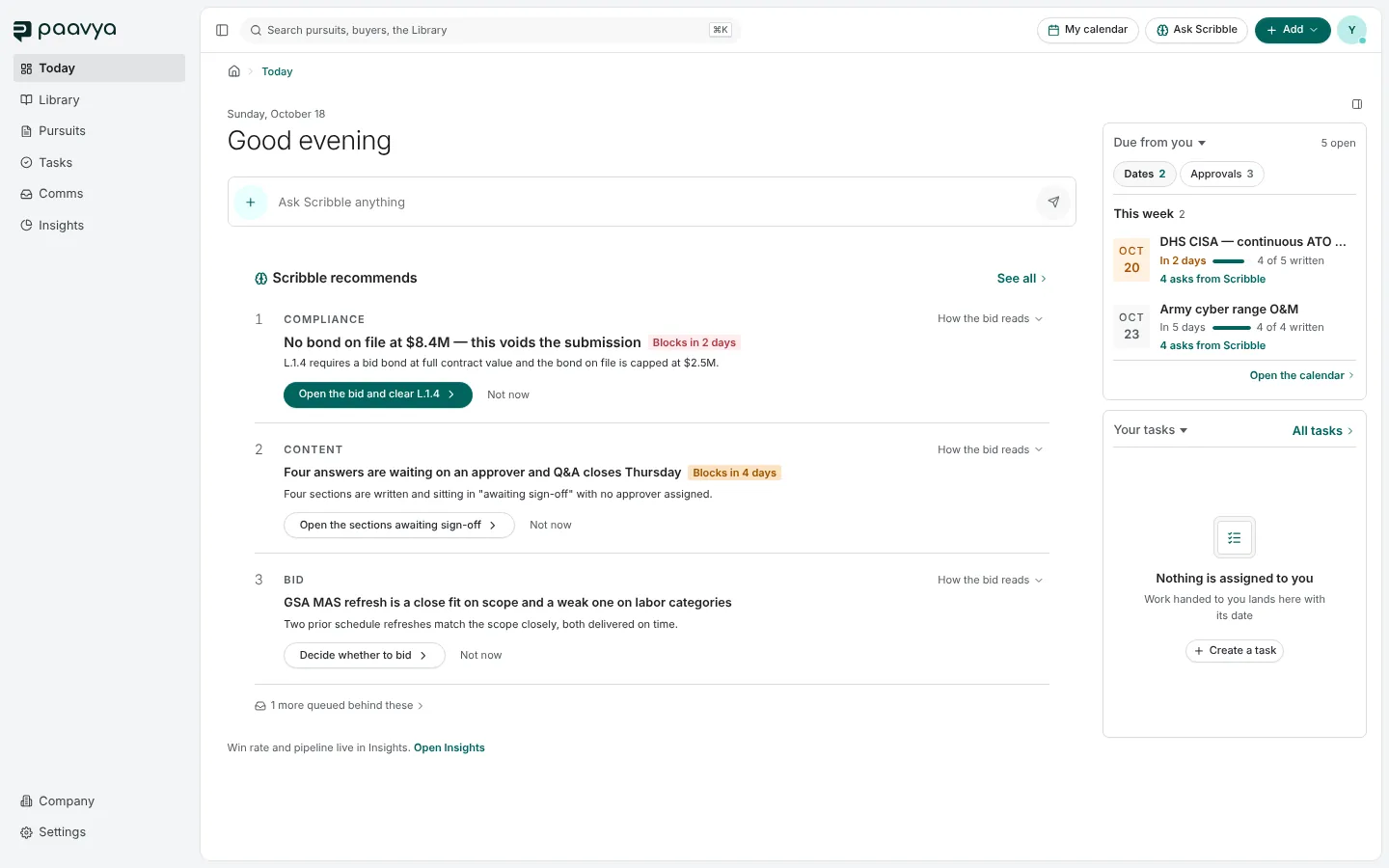
Your home screen. What Scribble recommends you do first, what is due from you this week and the tasks handed to you.
Today is where Paavya opens. It answers one question: what deserves your attention first? It shows no dashboards of figures. Those live in Insights.
Ask Scribble anything
The bar under the greeting is the quickest way to ask Scribble something.
- Type a question and press Enter. It opens in Comms as a new Scribble chat, so the answer has room and stays in your history.
- Press the plus for a menu of starters and quick actions, such as starting a pursuit or adding to the Library. A pick from that menu answers right here, under the bar, with the real control you need, not a description of it.
The microphone, when you see it, starts a spoken conversation. See Ask Scribble.
Scribble recommends
Up to three things, ranked by what is at stake and how soon. Each row tells you:
- What kind of item it is, such as Compliance, Content or Bid.
- What is wrong, in one line, and why it matters, with a chip when it blocks a submission ("Blocks in 2 days").
- One action that does something about it, such as Open the bid and clear L.1.4. The first row's action is filled; the rest are outlined.
- How the bid reads, which opens the evidence behind the recommendation: the bid's buyer history, past performance, capacity and competitive signals.
Not now sets a row aside for this visit. The card then says that rows were set aside and offers them back, so nothing quietly disappears. See all opens the full list on the Intelligence page.
Due from you
The first card in the side panel lists what is waiting on you, grouped by when it is due:
- Dates are response deadlines for the bids you are on, with how much of each response is written.
- Approvals are answers and sections waiting for your sign-off.
Open the calendar jumps to My calendar.
Your tasks
The second card lists tasks assigned to you. When there are none it says so, and offers Create a task. All tasks opens Tasks.
A brand-new workspace
Before your first pursuit exists, Today shows a welcome instead: Add to your Library and Start your first pursuit, each naming the ways in. After setup, anything you skipped waits on Today as a short checklist until it is done.
Pictures are from Paavya's demo workspace, so names, bids and figures are illustrative. Something here does not match what you see? Tell us, or ask Scribble in the app.